Ultra Rapid Prototyping For Young Ladies
We can make one-off programs like http-servers, command line utilities, this is absolutely breathtaking, and it comes with all the documentation.
We can generate years of code in just a couple of days, but here we run into problems.
You better have a good road-map, and you better have remembered to tell your AI to test often and self-improve.
The question is, of course, where do you get your road map from?
And the answer is wasteful, throw away programming, I call it rapid prototyping, or creating reference implementaions.
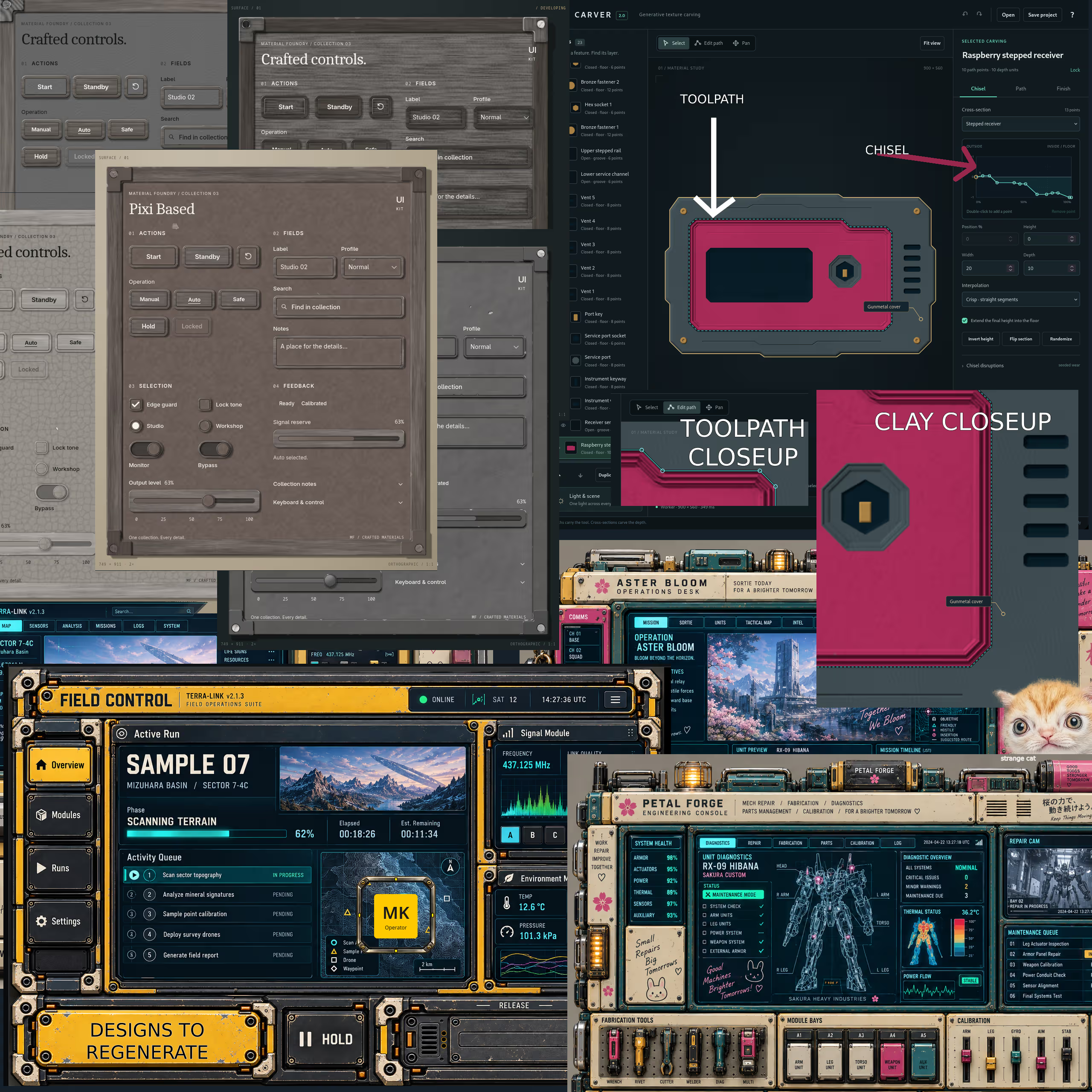
And to switch to a real example, I tasked myself this weekend with professional user interface creation.
Even though I knew, I actually asked: “How do I professionally decorate bootstrap 6 CSS framework”
The AI answered, oh the bootstrap theme uses ::before and ::after, to tuck decoration in the background of its components.
And I said, great, I forked the chat and in one tab stated, we are using PixiJs, in the other we are using native HTML canvas.
And described the creation of a algorithmic texture based program, that generates wood, metal, cookie and sci-fi design motifs for bootstrap.
I created two (you should try three) programs just to see, where they will take me, no pressure.
I used PixiJs a web game framework thinking, that I should not invent everything from scratch.
And then based on game theory, I did the opposite in the other project.
PixiJs looks nice, it is a UIKit flavored window, that very often looks like adventure game style wooden frames.
I had to pause development, I have to wait 5 days, because I used up my Pro usage I the web chat, third time this week.
I’ve decided to take care of this program and gently gude it forward, to make the textures more realistic, and I will give it away as a texture maker.
In my other more nitty gritty canvas based prototype, I instantly hit a major breakthrough.
The AI was struggling with textures around the edges, and I said, stop.
Create toolpaths, this is a word from the world of CNC machining, that I learned from Diresta.
And I said, use a carving tool made out of a squiggle, and let me make the squiggles, but sometimes interfere with them.
A squiggle is how I make a chisel to ride the tool-path, that apples shadow to the generative texture beneath, it was wood.
AI instantly begun creating pretty borders for buttons, and boxes, check-boxes and containers.
The interference is a way to add chipped paint, or another motif like vents.
The results were very nice, and direction of light sensitive, but they were never going to become very realistic.
At which point we entered a second breakthrough, don’t make them look realistic, make them look like clay.
And we will send them for regeneration to imagegen, using the clay images as known-geometry templates.
And another image as style, with some cautions image prompting and probably more ML work as it arrives.
So the prototype was shadow over generative texture, then I switched to chisel and toolpaths, and finally shaping clay as template.
The clay is just how I make the shape, the full breakthrough was the realization, that a button chisel is low and goes up high and stays high to make a face.
And a checkbox for example, goes high, and then dips back down, to make an indentation for the little check mark.
A container is very much like a button it has a flat face, a text input starts high and dives low.
Given that my tool paths hold all the geometry for it, I ca easily do a nine slice where the top and side borders repeat and resize.
So even before I use image generation, I can preview the entire theme in clay, and vary borders, which way things dip or rise and so on.
I also use three.js and blender for my theme experiments, but this chisel thing is very easy to operate.
You can move the toolpath to change where the carving takes place, and the squiggle to change the shape of the border or hole being made.
This is a web page tool that can generate 9-sliced images for ::before, and instantly give a clay preview of the shape of the theme.
And because you already have the images, you have a clear path, to use imagegen for photographic or highly realistic decoration.
You don’t have to get confused, or confuse your ai about blender textures, you just need to reprocess the clay into some intricate decorated thing.
The 9-grid process is a way of resizing borders withut distortion, it repeats the borders (4), tiles the body (1), and leeps cornes (4) fixed... (9).
Image gen is likely to distort the template, especially as it is adding screws, or shiny gems, or metallic covers, brass fittings, stables and flowers or fruits.
But you have easy to adjust toolpath, a ling line, easy to adjust chisel, squggle, and easy to adjust 9 grid, it is just 4 lines, that make those 9 tiles.
That was the clay breakthrough, everything became easy and clear, and simple to nudge even by the end user who purchases the user interface.
What started as throw away code, as a prototype in search for an escape from complexity, and to dot all the I’s.
Became a useful little tool, that can be fully automated by AI.
And even used by the end user, who can still see their new button, though in clay until they send it in to heir image generator.